Transfer progress
Your progress lives with your account, not your phone. Link an account and it comes with you.
Short Version
- 1. On your old device: Settings, then Link Account.
- 2. Sign in, or create an account if you don't have one.
- 3. On the new device: install the app and link the same account.
We recommend every player links their account in case of device loss or corruption. There is no way for you to retrieve your progress if it hasn't been linked. Linking is a manual process for every participant.
Step by step
- 1
Open Settings on your old device
Start on the phone you've been playing on. Open Sea Hero Quest and go to Settings.
- 2
Tap Link Account
In Settings you'll find Link Account. This is what ties your progress to something other than this handset.
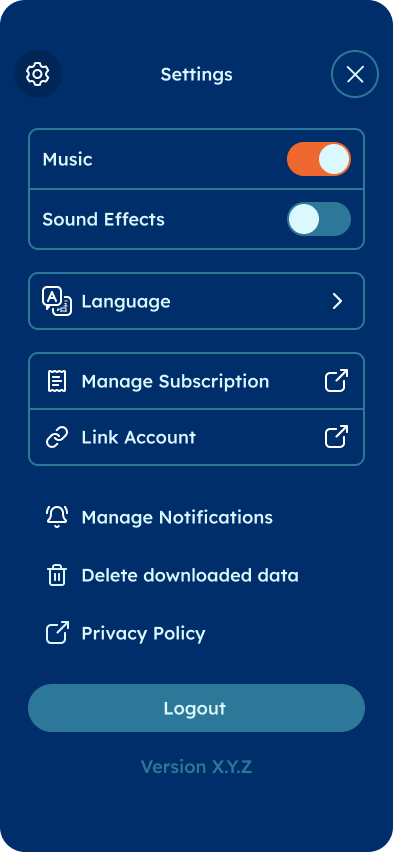
Settings. Link Account is what you want. - 3
Sign in, or create an account
Linking opens in your browser on a Unity Player account page. That's expected, and it's where your account lives. Continue with Google or Apple, or use an email address and password.
Pick something you'll still have access to on the new phone. If you sign in with Apple here and then move to Android, you'll need to be able to use that same Apple sign-in again.
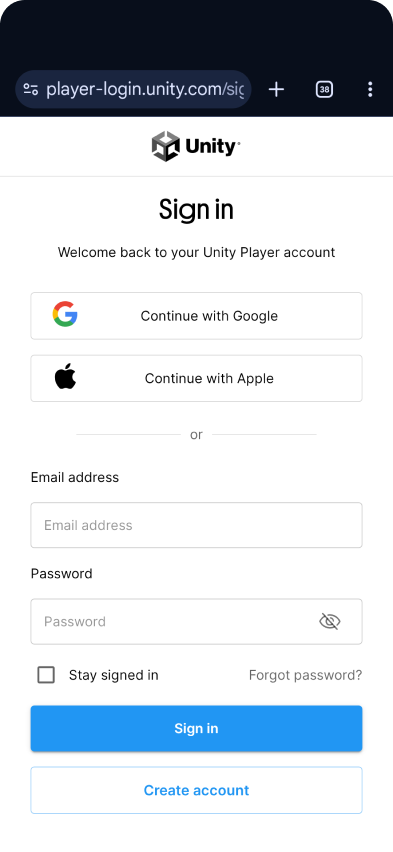
Sign-in opens in your browser. This page is the real thing. - 4
Install the app on the new device
Download Sea Hero Quest on the new phone from the App Store or Google Play, then open it.
- 5
Link the same account there
Go to Settings, tap Link Account again, and sign in with the same account you used in step 3. Your progress comes across.
Good to know
- Your gameplay progress and your subscription are two separate things. Progress follows your Sea Hero Quest account; PLUS is billed by Apple or Google and follows the store account you paid with.
- That matters if you're switching between iOS and Android. Your progress moves either way, but an App Store subscription can't be carried over to Google Play, or the other way round. Cancel the old one and subscribe again on the new platform.
- You can link the same account on more than one device, so it's worth doing even if you're not switching phones yet.
- Don't log out or uninstall on the old device until you've seen your progress on the new one. An unlinked account can't be recovered, so it's worth checking before you wipe anything.
If you linked an account and your progress still hasn't appeared on the new device, that we can help with.
Linked, but nothing showing up? Ask in the WhatsApp Community, email support@glitchers.com with both device models and the email address you linked with, or browse the FAQ.