How to subscribe
Sea Hero Quest is free to play, and you contribute to research either way. Sea Hero Quest PLUS unlocks your own insights - and helps fund the science.
What PLUS gives you
Get insights and compare yourself against the world.
- Track your progress over time.
- Unlock the game archive.
- Discover your brain animal.
- Actively support researchers.
Subscribing, step by step
- 1
Install and open the app
Download Sea Hero Quest from the App Store or Google Play, then open it on your phone. Subscriptions are handled inside the app, so there's nothing to buy on this website.
- 2
Create an account or log in
Your subscription is tied to your account, so your progress and insights follow you if you change phone. If you're playing as a guest, create an account first.
Sign-in opens in your browser on a Unity Player account page. That's expected, and it's where your account actually lives. Continue with Google or Apple, or use an email address and password. Tap Create account if you don't have one yet.
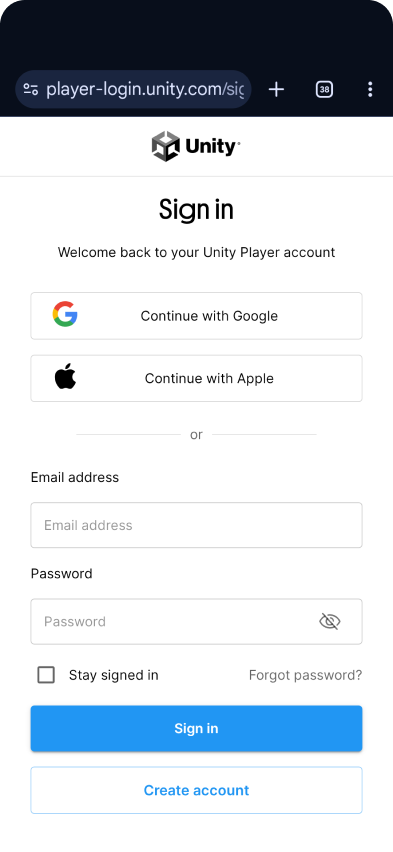
Sign-in opens in your browser. This page is the real thing. - 3
Choose your plan, then tap Subscribe
You'll see two plans: Basic, which is what you're on by default, and PLUS. Select PLUS to see everything it includes, then tap Subscribe. The price shows in your local currency before you commit to anything.
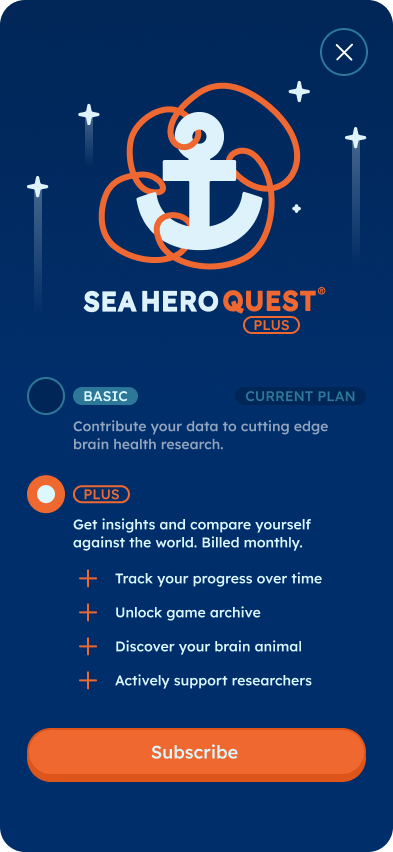
Basic is your current plan. Select PLUS, then Subscribe. - 4
Confirm with Apple or Google
Payment runs through the App Store or Google Play using the payment method already on your account. Face ID, a fingerprint or your store password confirms it. We never see or store your card details.
- 5
You're subscribed
Your insights unlock straight away. Some comparisons need a few sessions of play before they settle, so keep playing your daily quest and they'll fill in.
New phone, or already subscribed?
Log in with the same account, and make sure you're signed into the same Apple or Google account you originally paid with, which is what the store checks against. If PLUS doesn't appear straight away, force-close the app and open it again; that also helps if a payment has only just gone through. Still nothing? Get in touch and we'll sort it out.
Managing or cancelling
Because billing is handled by the app stores, you change or cancel PLUS there rather than with us. You keep your insights until the end of the period you've paid for.
Good to know
- You don't need to subscribe to play, and your gameplay contributes to research either way. The subscription covers insights and progress tracking.
- There's no free trial. The game itself is free, so you can try it properly before deciding.
- Sea Hero Quest is not a medical device. Your insights are for general wellness and curiosity, not diagnosis.
Something not right with a payment? Ask in the WhatsApp Community, email support@glitchers.com, or browse the FAQ.